01 — About

Hello,
world.

My name is Satya Thorp, and I'm currently enrolled in the cybersecurity program at Flatiron School — computer networking, system hardening, SIEM and threat hunting, security architecture, incident response, and penetration testing. I'm excited to learn it all and put it to the test.

I have a strong passion for all things right to repair, data, and privacy. I genuinely enjoy talking to people, troubleshooting, and tinkering with computers — from fixing my own gear to getting my current flavor of Linux running smoother.

Please check out my homelab project and blog post, and let me know what you're working on. I'd love to draw inspiration and chat about it. Thanks for visiting.

Studying
Cybersecurity — Flatiron School
Looking for
Help desk / IT support
Care about
Right to repair, privacy

02 — Projects

Things I've built
and broken.

Every project here runs on hardware I own, and every writeup includes the part where it didn't work.

Up next

Offboarding workflows, shared mailbox permissions, and an osTicket knowledge base so the fixes are documented for someone other than me.

Projects / Helpdesk Lab

Windows Domain
Helpdesk Lab

Running 2026 Self-directed

A full Active Directory environment on Proxmox — domain controller, Windows 11 client, OPNsense router, and an osTicket queue — built so I could work real helpdesk tickets against it. Then I broke it on purpose to practice diagnosing blind.

Stack
Proxmox VE · Windows Server 2022 · Windows 11 Pro · OPNsense · Debian 13 · osTicket
Skills
AD DS & DNS · Group Policy · NTFS & share permissions · PowerShell · ticket workflow
Scope
4 VMs, isolated virtual switch, 4 tickets worked end to end
Lab network topology A home network connects through vmbr0 to an OPNsense router running inside the Proxmox host. OPNsense also connects to vmbr1, an isolated bridge with no host IP and no physical NIC, which carries three virtual machines: DC01, WIN11-CLIENT and the ticketing server. PROXMOX HOST Home network existing LAN VMBR0 OPNsense Router · DHCP · Firewall 10.10.10.1 vmbr1 no host IP · no NIC DC01 10.10.10.10 Server 2022 · AD DS · DNS · SMB WIN11-CLIENT 10.10.10.20 Windows 11 Pro workstation ticketing 10.10.10.30 Debian 13 · osTicket
Topology OPNsense has one leg on the home network and one on vmbr1. Nothing on the isolated bridge can reach the LAN, so lab DHCP and DNS can't leak out and I can break things without taking the house offline.

What it does

Tickets worked

What broke along the way

03 — Blog

I built a Windows domain helpdesk lab — then broke it on purpose

Reading about Active Directory only gets you so far. I wanted somewhere I could actually do the work an entry-level helpdesk tech does every day: unlock accounts, reset passwords, onboard new hires, and figure out why a drive stopped mapping.

So I built a full domain environment on Proxmox, wired it to a real ticketing system, and started working tickets against it.

Here's the build, the mistakes, and the tickets.

The environment

Four VMs on a single Proxmox host, all on an isolated internal network:

VMRoleIP
OPNsenseRouter / DHCP / firewall10.10.10.1
DC01Windows Server 2022 — AD DS, DNS, file shares10.10.10.10
WIN11-CLIENTWindows 11 Pro workstation10.10.10.20
ticketingDebian 13 running osTicket10.10.10.30

The design decision that matters most: isolation. I created a second Linux bridge in Proxmox (vmbr1) with no IP on the host and no physical NIC attached — a pure virtual switch. OPNsense straddles both worlds, with one leg on my home network and one on the lab network.

That means my domain controller's DNS and DHCP never leak onto my home network, and I can break things without taking down my actual internet.

Building it (and what went wrong)

VirtIO drivers, twice

Proxmox presents virtual disks and NICs using VirtIO — fast, but Windows has no built-in drivers for it. This bit me twice on the same VM.

During install, Windows insisted there were no drives to install to. The 80GB disk was right there; Windows just couldn't see the controller. Fixed by attaching virtio-win.iso as a second CD drive and loading vioscsi\amd64\2k22 at the partition screen.

Then after install, Network Connections was completely empty — not "disconnected," genuinely no adapter. Same root cause, different device. Installed the NIC driver from Device Manager against NetKVM\2k22\amd64.

Takeaway

On a Linux hypervisor, Windows guests need VirtIO drivers loaded twice — storage during setup, networking after.

Share permissions vs NTFS permissions

Created C:\Shares\SalesShare, shared it, and tried to reach it from the client at \\DC01\SalesShare.

Access denied.

Windows file shares have two independent permission layers, and the more restrictive one wins:

  • Share permissions govern access over the network (SMB)
  • NTFS permissions govern access to the files on disk

My share permissions were wide open — Everyone with Change + Read. NTFS was the problem: the Security tab listed only Administrators, SYSTEM, and CREATOR OWNER. SMB let the connection in and the filesystem slammed the door.

icacls "C:\Shares\SalesShare" /grant "HOMELAB\Domain Users:(OI)(CI)M"
Takeaway

"Access denied" on a share means checking both layers. One being permissive tells you nothing about the other.

The GPO that saved perfectly and did nothing

I configured a domain password policy, ran gpupdate /force, and verified:

Get-ADDefaultDomainPasswordPolicy

Got back the defaults. Minimum length 7. Max age 42 days. Lockout threshold 0. None of my settings had applied.

The settings were saved. The syntax was fine. gpupdate reported success. The problem was in the title bar of the editor window — I'd been editing the Default Domain Controllers Policy, not the Default Domain Policy.

GPOLinked toGoverns
Default Domain PolicyDomain rootDomain-wide account & password policy
Default Domain Controllers PolicyDomain Controllers OUDC-specific security settings

Domain account policy only takes effect from a GPO linked at the domain root. Mine was valid, saved, and scoped to entirely the wrong place.

Takeaway

"Configured" and "applying" are different claims. Verify effective state, not the config screen.

The policy baseline

Once I was editing the right GPO:
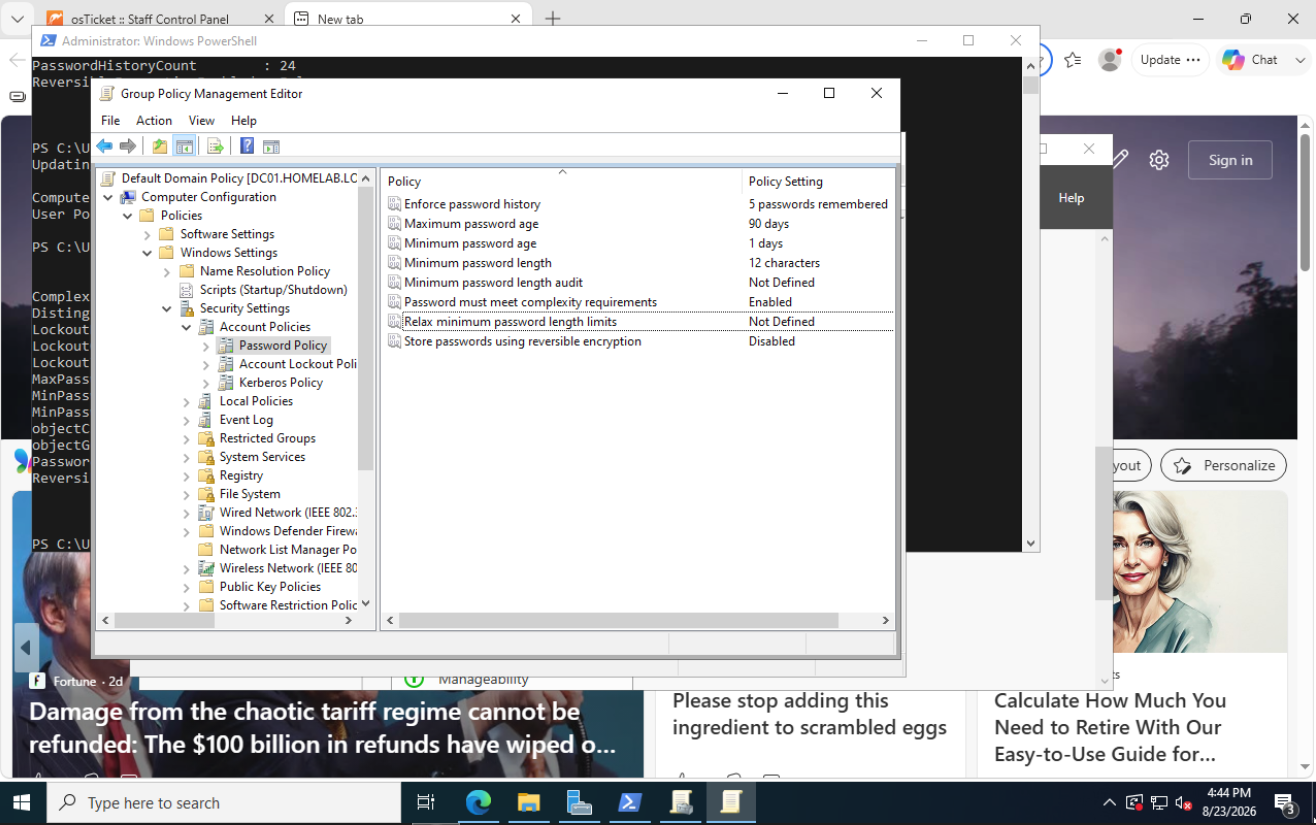
Group Policy Management Editor showing the Default Domain Policy password settings: 12 character minimum, 90 day maximum age, 1 day minimum age, 5 passwords remembered, complexity enabled
Fig. 01Password policy in the Default Domain Policy — 12 character minimum, 90 day maximum age, complexity enabled.
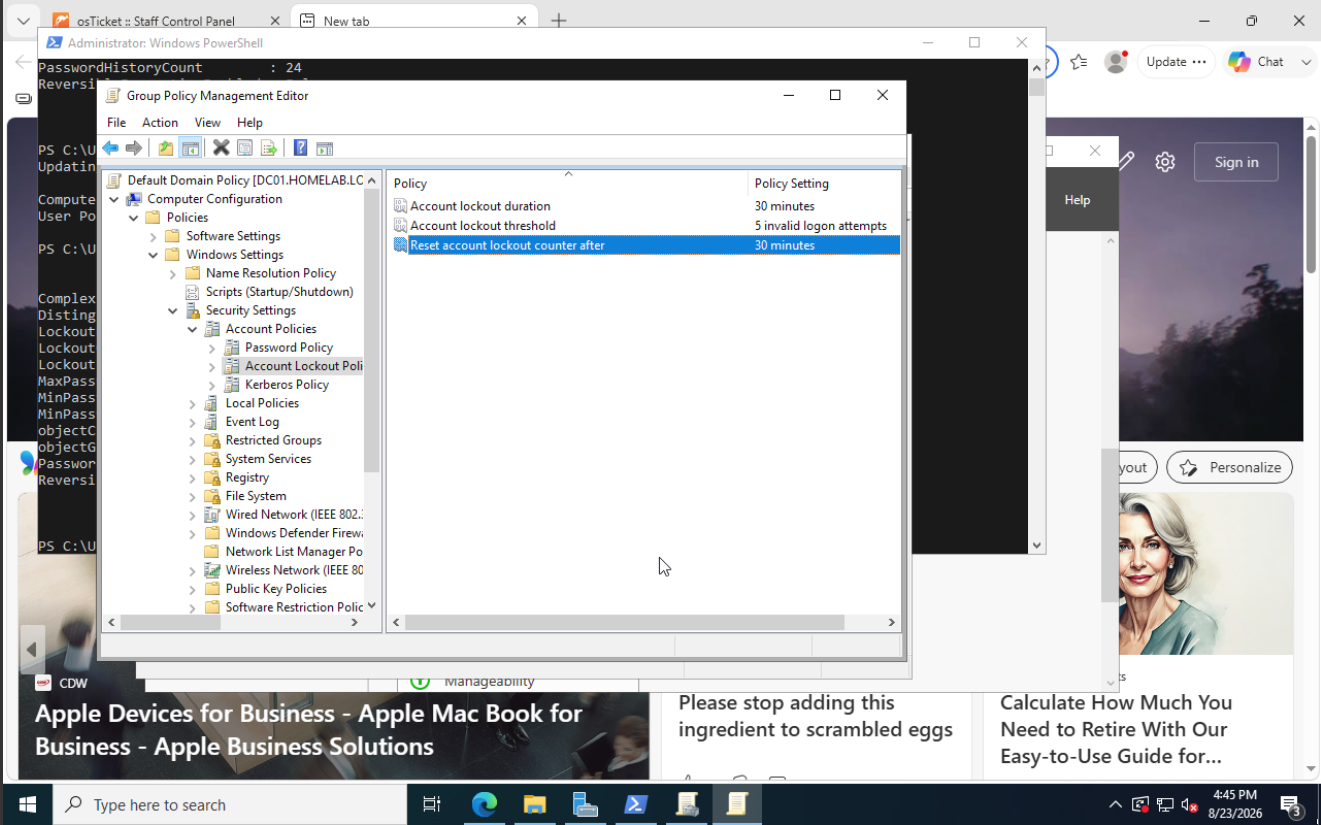
Account Lockout Policy in the Default Domain Policy: 30 minute lockout duration, threshold of 5 invalid logon attempts, counter reset after 30 minutes
Fig. 02Lockout after 5 invalid attempts, 30 minute duration.

Worth knowing: the out-of-box lockout threshold is 0, meaning accounts never lock out no matter how many times someone fumbles their password.
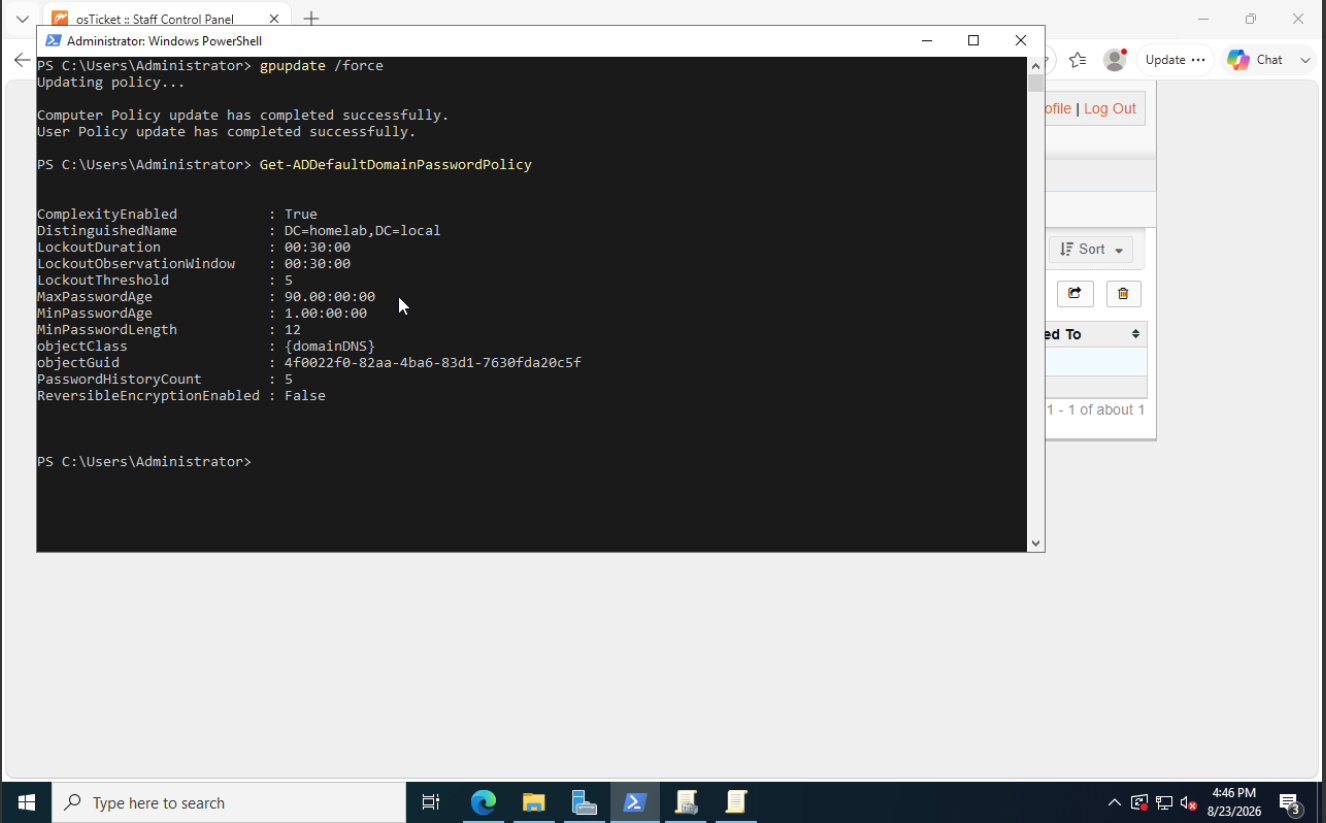
PowerShell output from Get-ADDefaultDomainPasswordPolicy confirming ComplexityEnabled True, LockoutThreshold 5, MaxPasswordAge 90 days and MinPasswordLength 12
Fig. 03Verified from PowerShell rather than trusting the GUI.

Automated drive mapping

Group Policy handles department drives — Sales gets S:, HR gets H:.
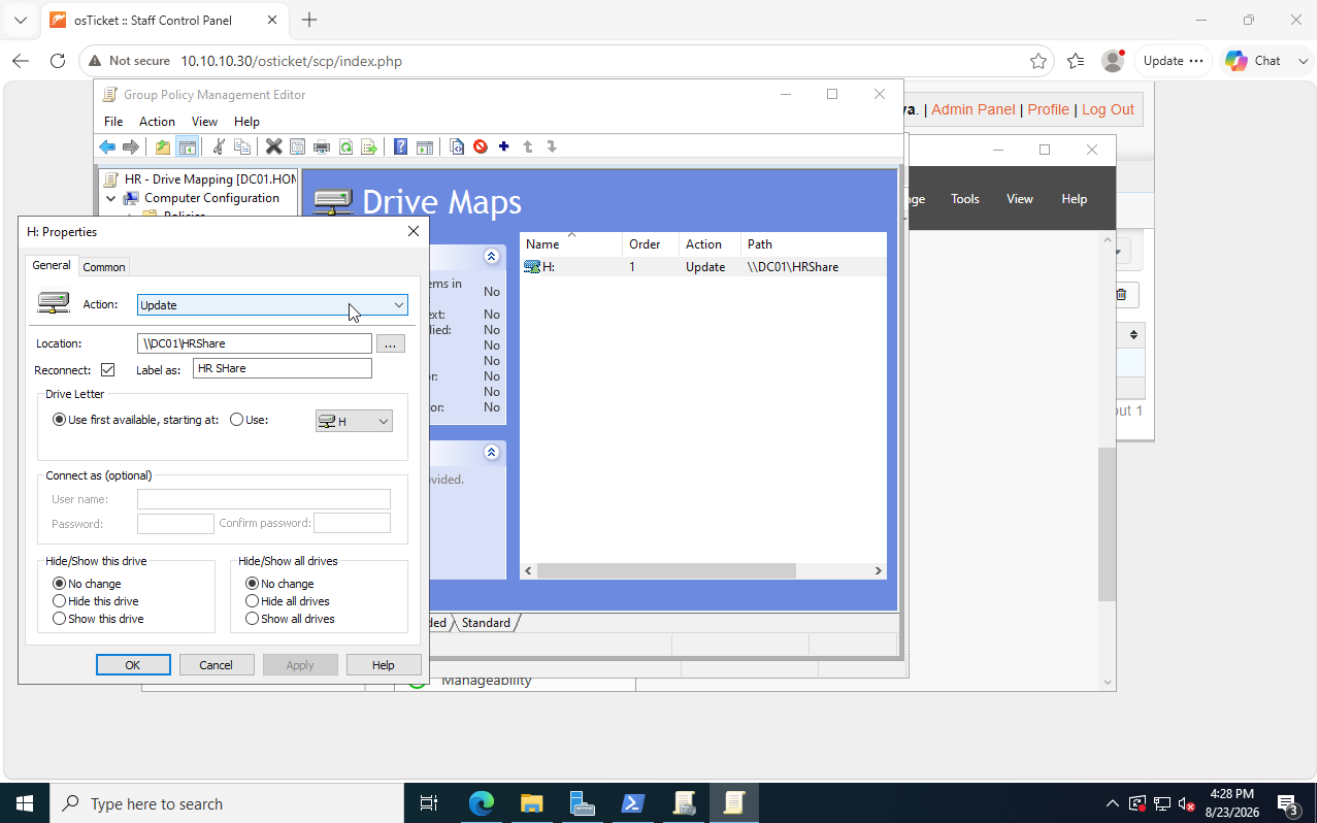
HR drive mapping GPO with the H drive properties open, Action set to Update and location set to the HRShare on DC01
Fig. 04Drive Maps preference with Action set to Update.

I used Update rather than Create. Update works whether or not the mapping already exists, so it's safe to re-apply. Create fails noisily if the drive is already there.
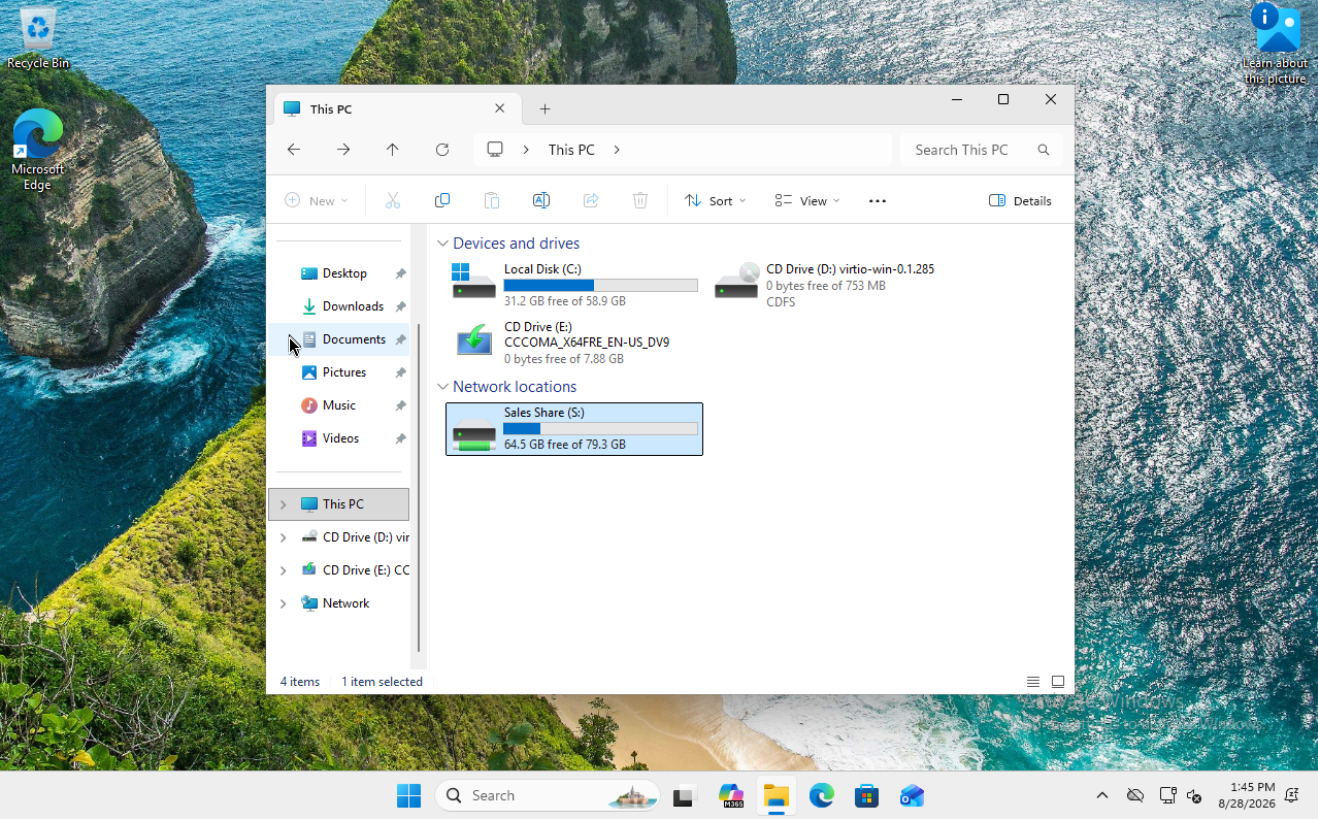
This PC on the Windows 11 client showing Sales Share mapped to the S drive under Network locations
Fig. 05The result on the client — Sales Share mapped to S: automatically at logon.

Drive mappings apply at logon, not at policy refresh. gpupdate /force alone won't do it.

Working the tickets

Infrastructure is only half of it. Every scenario below was logged in osTicket, diagnosed, resolved, and closed with notes.
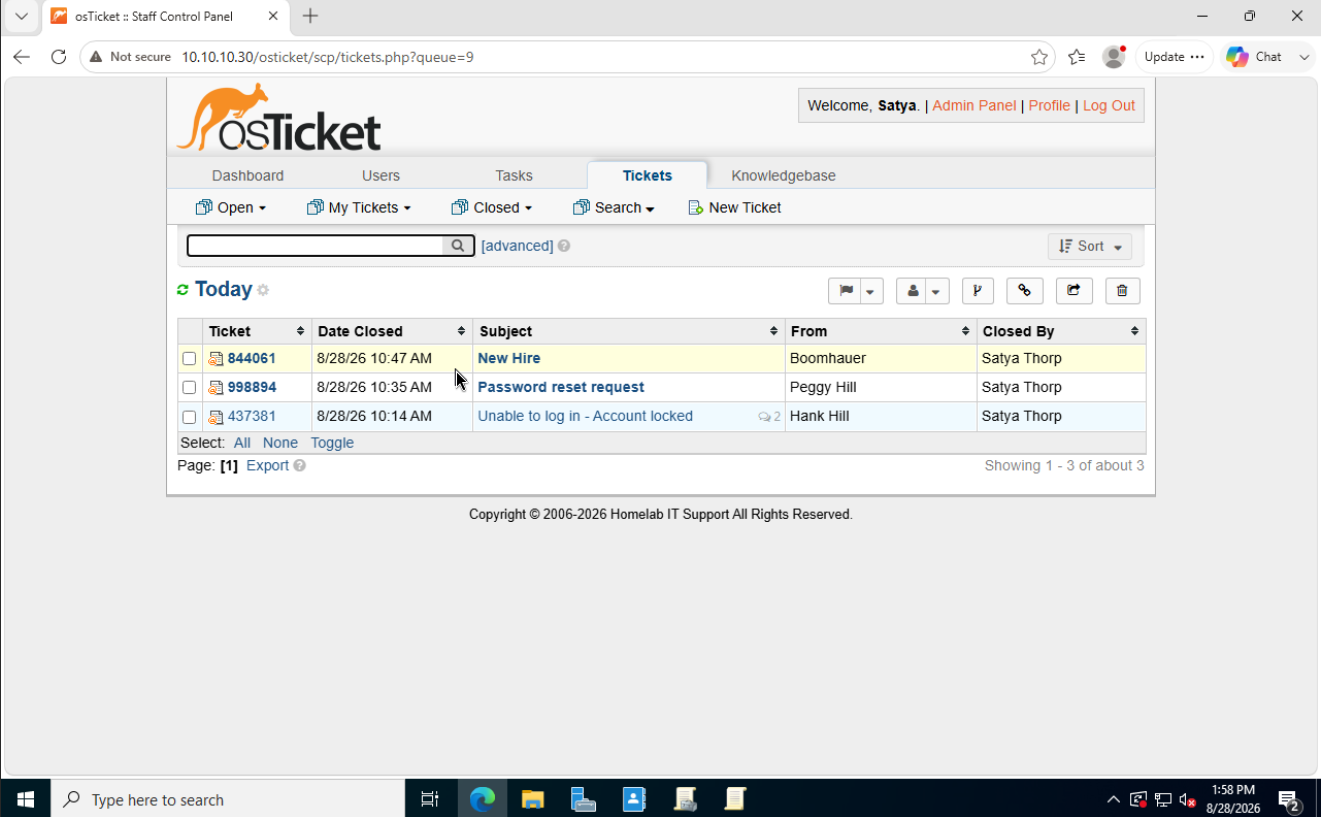
osTicket closed queue listing three resolved tickets: New Hire, Password reset request, and Unable to log in - Account locked
Fig. 06The queue after a working session.
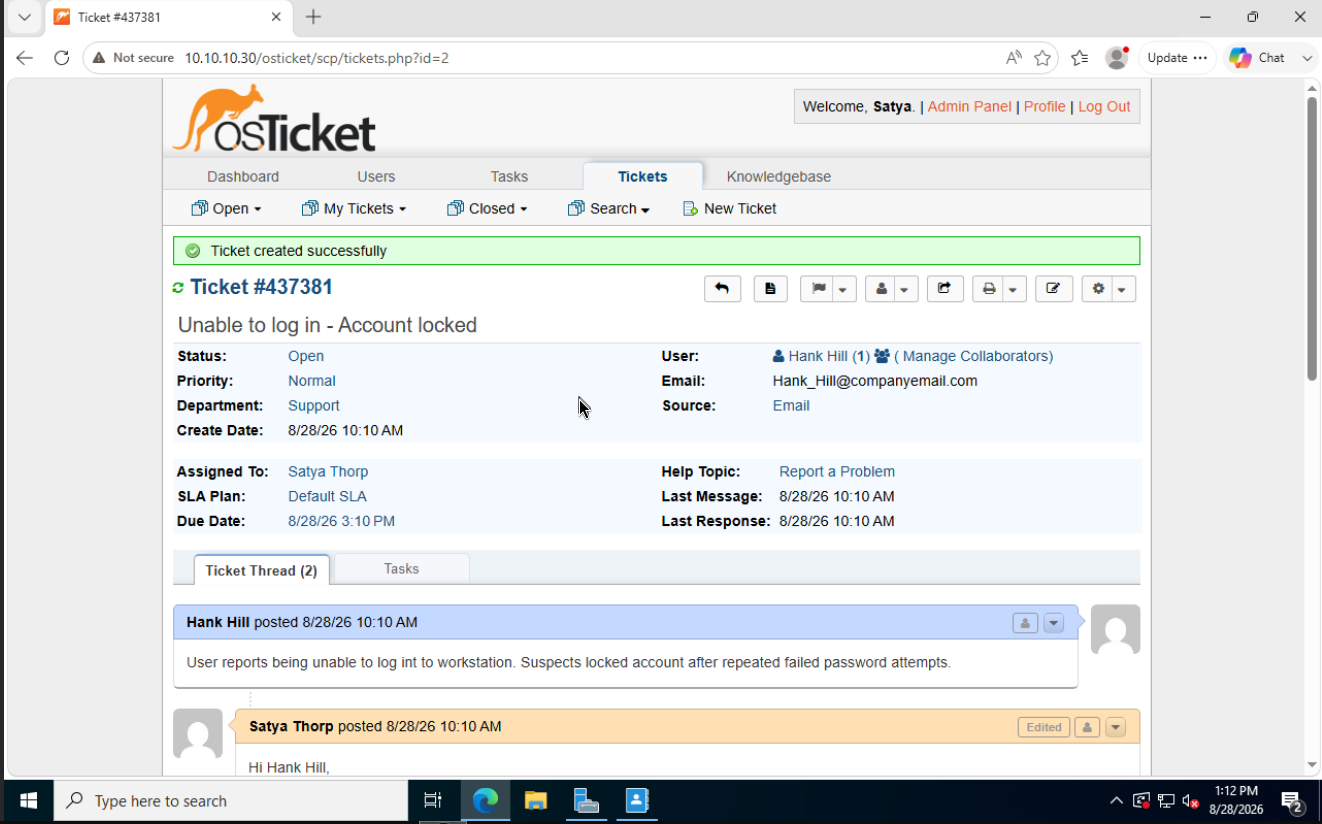
#437381

Account locked

osTicket ticket 437381 from Hank Hill, subject Unable to log in - Account locked, assigned to Satya Thorp
Fig. 07The lockout ticket as submitted.

User reported being unable to log in after repeated failed password attempts.

The instinct is to unlock immediately. The better habit is to confirm the state first, because "I can't log in" has at least four different causes — locked account, expired password, disabled account, or a mistyped username — and each has a different fix.
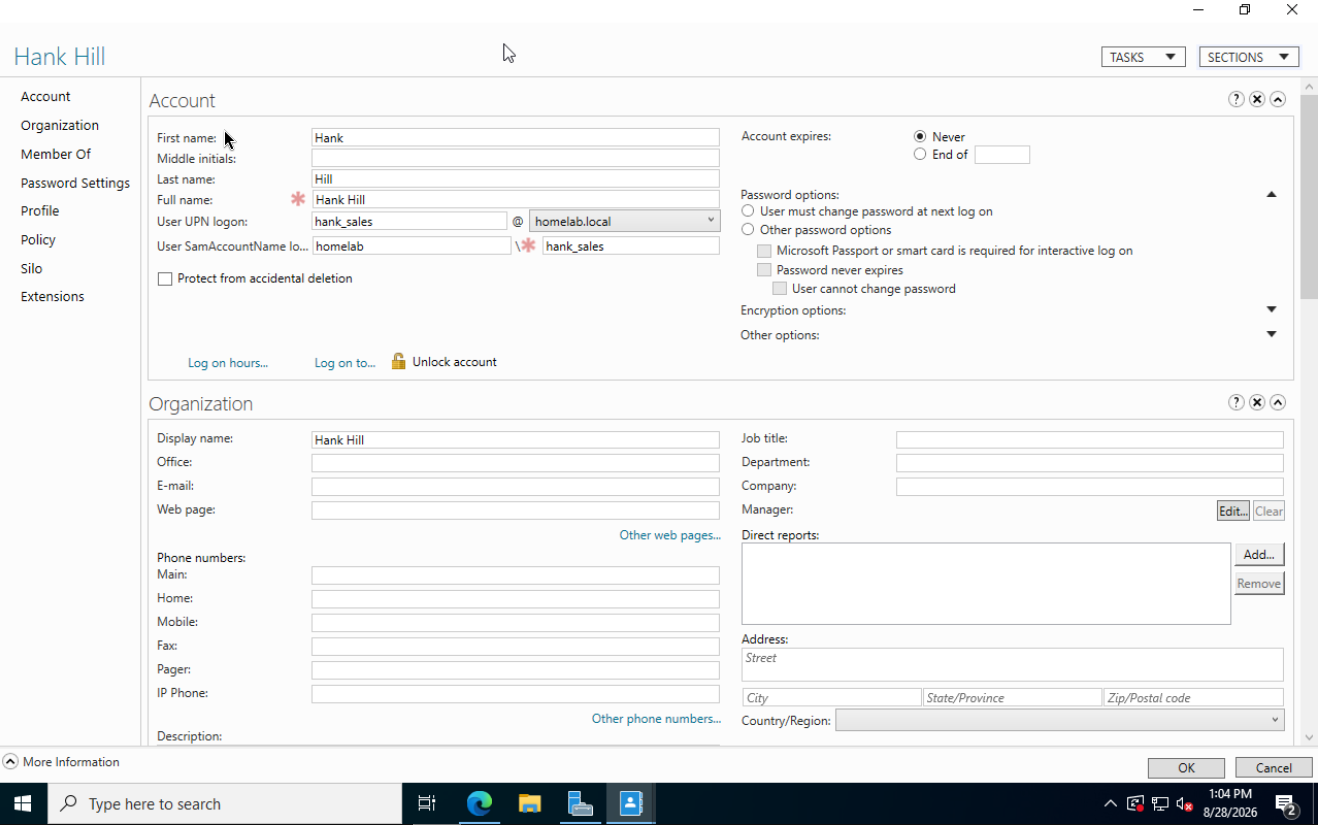
Hank Hill Active Directory account properties with the Unlock account option showing an open padlock
Fig. 08The Unlock account option confirms the lockout — and the same screen rules out a disabled or expired account.
# Diagnose
Get-ADUser -Identity hank_sales -Properties LockedOut,BadLogonCount,LastBadPasswordAttempt,PasswordExpired

# Resolve
Unlock-ADAccount -Identity hank_sales

Worth knowing for real environments: Event ID 4740 logs lockouts along with the source workstation. Repeated mystery lockouts are often a stale mapped drive or a service running under an old password — not the user at all.

#998894

Password reset

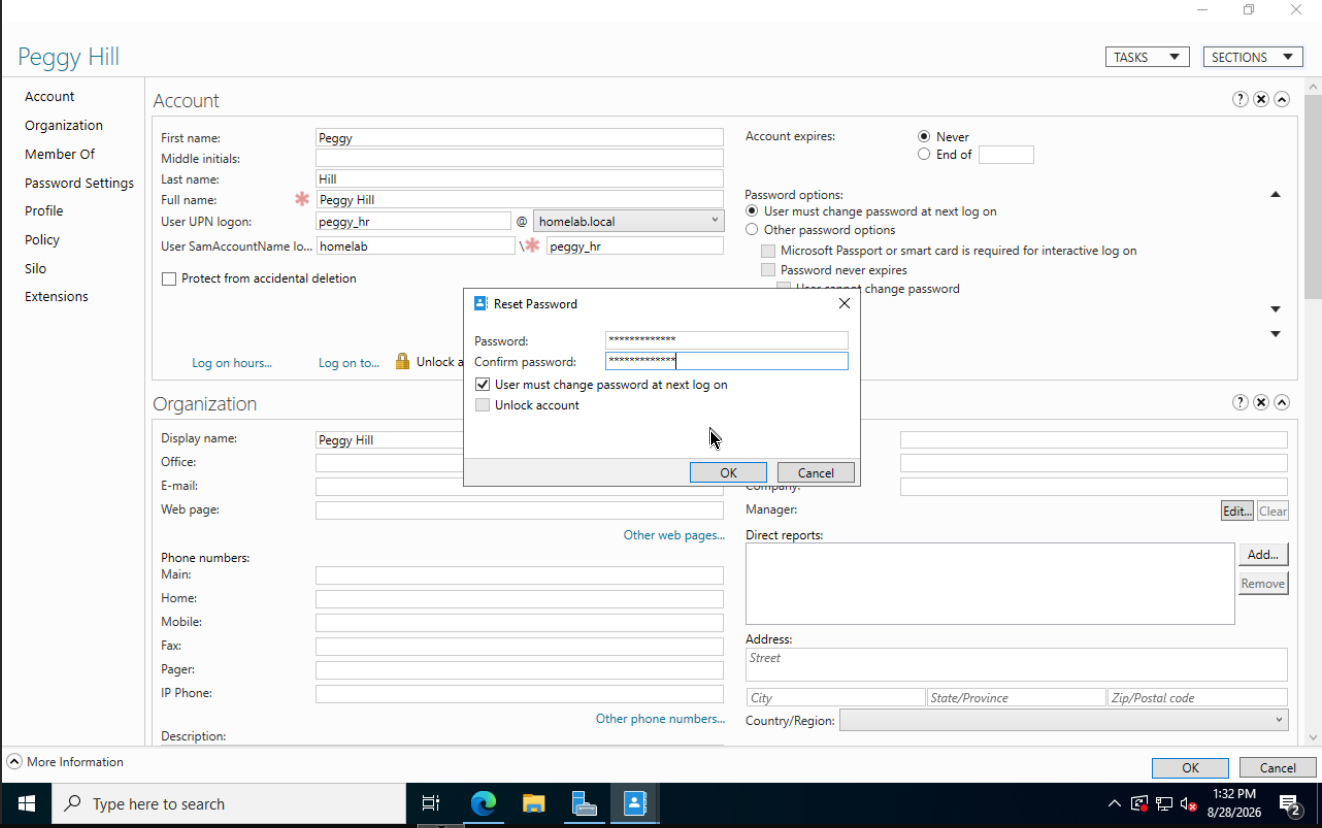
Reset Password dialog for Peggy Hill with User must change password at next log on checked
Fig. 09Reset with "User must change password at next log on" checked.

The checkbox is the important part. Admins shouldn't know user passwords — forcing a change makes the temporary password single-use, and the user ends up with something only they know.

Set-ADAccountPassword -Identity peggy_hr -Reset -NewPassword (ConvertTo-SecureString "TempPass2026!" -AsPlainText -Force)
Set-ADUser -Identity peggy_hr -ChangePasswordAtLogon $true

Then the policy showed up in the real world:
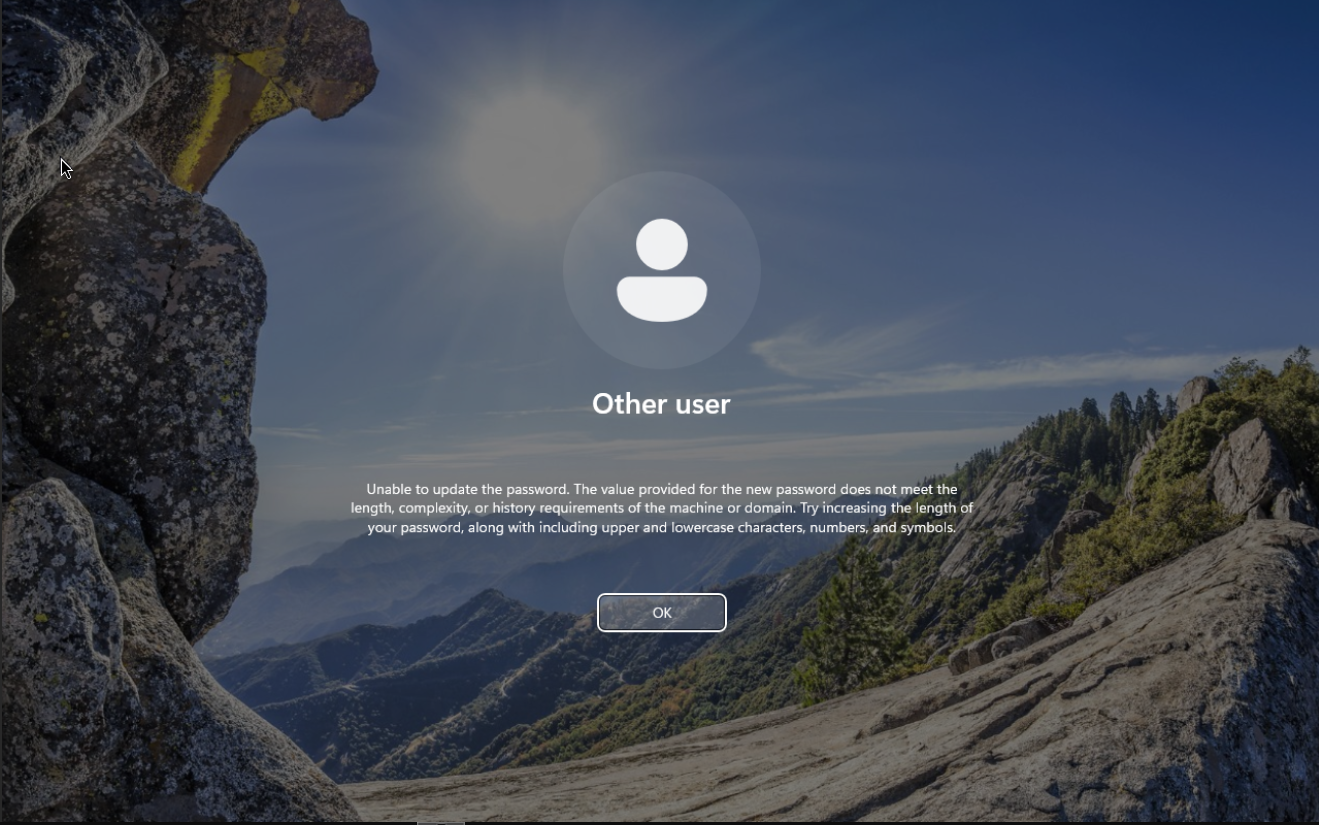
Windows sign-in screen rejecting a new password for not meeting the length, complexity or history requirements of the domain
Fig. 10The 12-character policy enforcing itself against a weak password at the change-password prompt.

That screenshot is the whole point of the exercise — a policy I configured in a GPO editor, refusing a password on a real login screen.

#844061

New hire onboarding

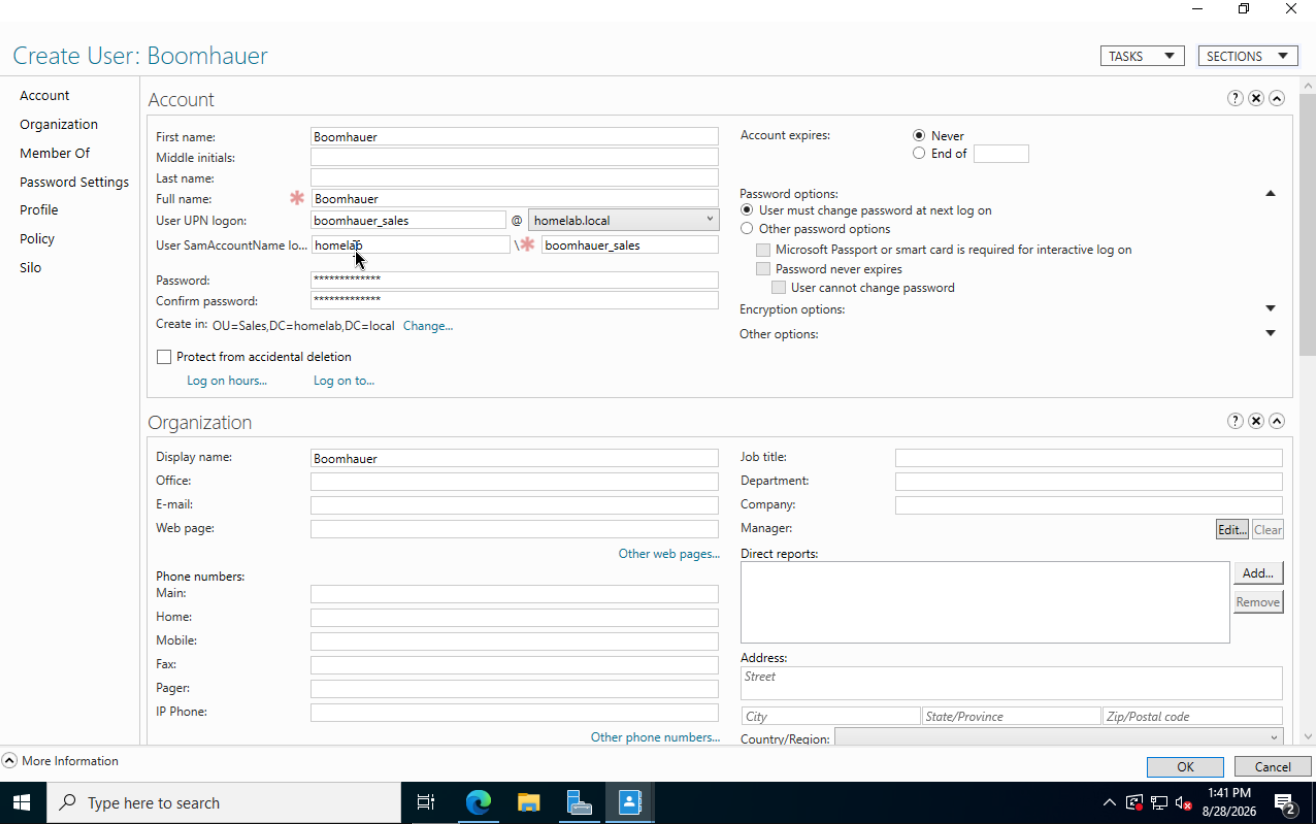
Create User dialog for Boomhauer, created in the Sales OU with the logon name boomhauer_sales and a forced password change at next logon
Fig. 11New Sales account created directly in the Sales OU.

Onboarding is a workflow, not a single fix. My checklist:

  • Account created in the correct OU
  • Naming convention followed (first_department)
  • Temp password set, forced change enabled
  • Group membership verified
  • Test login successful
  • Department drive mapped and writable

The OU placement is the part that quietly matters. Create the account in the default Users container instead of the Sales OU and everything looks fine — until the new hire logs in on day one with no department drive, because the drive mapping GPO is scoped to the OU.

I verified the whole chain by logging in as the new user: forced password change, desktop loads, S: maps automatically, file writes to the share.

#345455

Drive not mapping

For this one I broke my own environment on purpose. I changed the Sales drive mapping GPO to point at \\DC01\SalesShare2 — a path that doesn't exist — then worked the ticket blind.
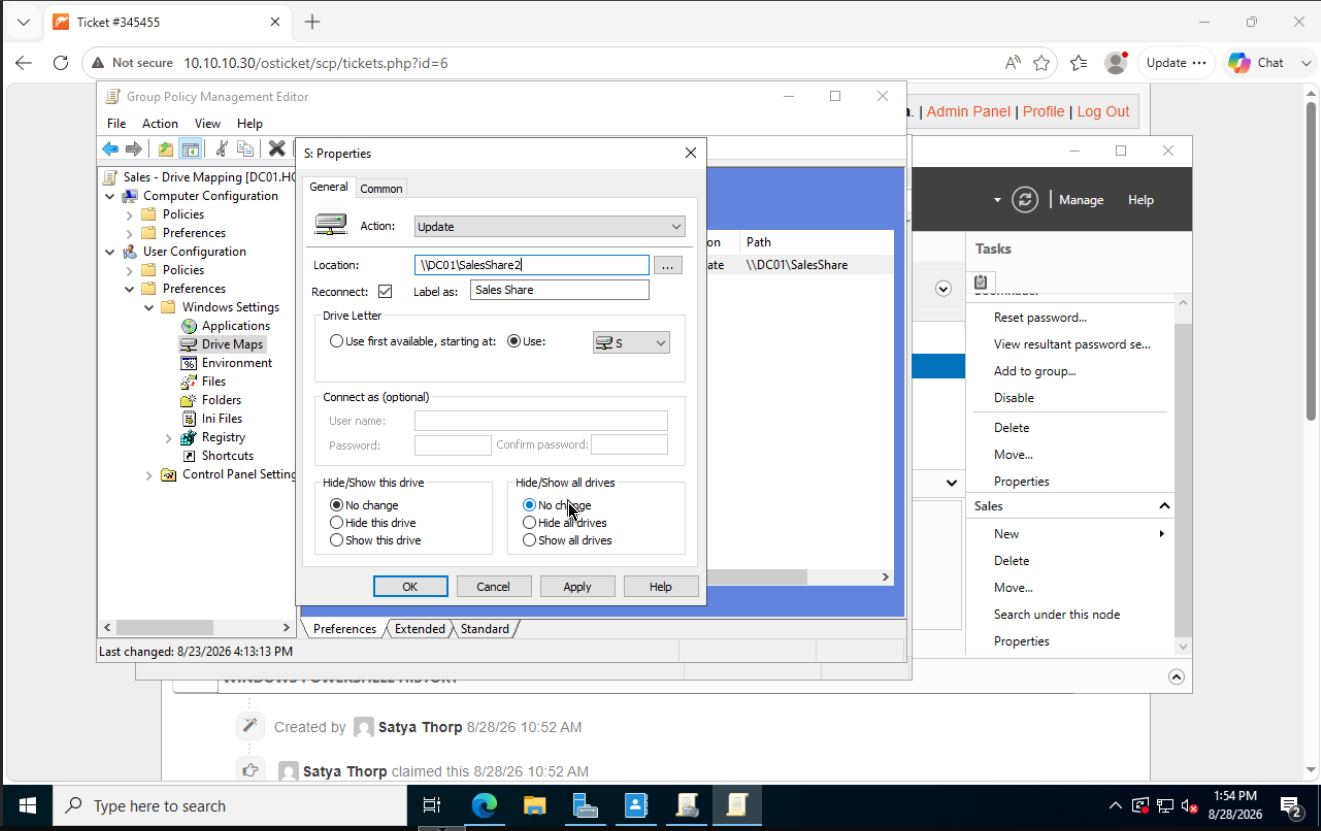
Sales drive mapping GPO with the location field edited to SalesShare2 on DC01, a share that does not exist
Fig. 12The deliberate break: a valid GPO pointing at an invalid target.

This is a different kind of ticket. Nothing is "denied," nothing errors on screen. The drive is simply absent, and the user has no information to give you beyond "it's gone."

The workflow:

gpresult /r                      # Is the GPO even reaching this user?
gpresult /h C:\gpreport.html     # Full report, including failures

That first command splits the problem in half. If the GPO appears under Applied Group Policy Objects, delivery is fine and the setting is at fault. If it's missing, it's a linking, scoping, or filtering problem — a completely different investigation.

Mine was applying, which pointed at the setting. Testing the target directly confirmed it:

\\DC01\SalesShare2 — Network path was not found.

The policy was working perfectly. It was faithfully mapping a drive to nothing.

Takeaway

Narrow scope in order — is the policy reaching the user, is the setting correct, does the target actually exist. Jumping straight to recreating the GPO would have "fixed" it while teaching me nothing.


What I actually learned

The build taught me more than the tickets did, mostly because the build is where I made real mistakes with no answer key.

Three patterns kept repeating:

Layered systems fail quietly at the layer you're not looking at. Share permissions vs NTFS. GPO configured vs GPO applied. A policy that's valid but scoped wrong. In every case the surface I was looking at said everything was fine.

Verify effective state, not configuration. Get-ADDefaultDomainPasswordPolicy told me the truth when the GPO editor looked correct. gpresult told me the truth when the drive mapping looked correct.

Diagnose before you fix. Unlocking an account takes ten seconds. Knowing it was actually a lockout — and not an expired password or a disabled account — is what makes the ten seconds the right ten seconds.

Every VM is snapshotted at a known-good baseline, so I can keep breaking things and rolling back.

Next up: offboarding workflows, shared mailbox permissions, and building out a knowledge base in osTicket so the fixes are documented for someone other than me.

04 — CV

Satya Thorp

IT Support · Help Desk · Cybersecurity

Summary

Cybersecurity student at Flatiron School and Google IT Support certified, with six years of customer-facing work and a self-built Windows domain environment used to practice day-to-day help desk tasks: account lockouts, password resets, new hire onboarding, and Group Policy troubleshooting. Comfortable diagnosing before fixing, explaining technical things in plain language, and documenting what I find. Strong interest in right to repair, data protection, and privacy.

Projects

Windows Domain Helpdesk Lab

2026

Self-directed · Proxmox VE

  • Built a four-VM Active Directory environment — Windows Server 2022 domain controller with AD DS, DNS and file shares, a Windows 11 Pro client, an OPNsense router, and osTicket on Debian 13.
  • Isolated the lab on a dedicated Proxmox bridge with no host IP or physical NIC, so lab DHCP and DNS can't reach the home network.
  • Configured domain password and lockout policy via Group Policy, and verified effective state with PowerShell rather than the GUI.
  • Automated department drive mappings by OU using Group Policy preferences.
  • Worked four help desk tickets end to end in osTicket — lockout, password reset, new hire onboarding, and a deliberately broken drive mapping diagnosed with gpresult.

Education

Cybersecurity Certificate, part-time

Jul 2026 – Aug 2027 (expected)

Flatiron School

  • Network security, operating systems, threat intelligence, incident response, penetration testing, cryptography, and governance, risk and compliance.
  • Project-based coursework with hands-on labs simulating real-world security scenarios, including Python scripting for security automation.

Culinary Arts Degree

Aug 2017 – Jun 2018

Institute of Culinary Education · Financial District, NY

Certifications

Google IT Support Professional Certificate

Mar 2026
  • Roughly 170 hours covering end-to-end IT support: hardware and software troubleshooting, networking protocols and DNS, Windows and Linux administration, directory services and cloud infrastructure, and core security practices including encryption and authentication.

Experience

Team Member — Wellness Department Primary

Mar 2024 – Present

Mom's Organic Market · Dobbs Ferry, NY

  • First point of contact for the department — diagnosing what a customer actually needs and translating technical product information into plain language.
  • Run regular inventory audits, reconciling physical counts against system records and tracing discrepancies back to their source in ordering, receiving, or data entry.
  • Manage departmental purchasing in ECRS Catapult, tracking open orders and prioritizing competing needs against deadlines.
  • Process vendor invoices with close attention to accuracy.

Production Assistant

Jan 2020 – Apr 2024

Perelandra Natural Food · Downtown Brooklyn, NY

  • Prepared daily hot bar menu items and other vegan foods for sale in the shop, executing a fixed daily schedule with precision under time pressure.
  • Covered the bar alongside production work, handling customer questions and concerns directly.

Farm Hand

May – Aug 2019

Farm.One · TriBeCa, NY

  • Harvested microgreens, edible flowers and herbs; monitored nutrient and pH levels; transplanted between dark and light rooms and planted new seed.
  • Worked across a stock of roughly 300 plant varieties, around 20 in production in a given week.

Line Cook

Apr – Jun 2018

Bar Boulud · Upper West Side, NY

  • Externship for the Culinary Arts degree. Worked garde manger, preparing salads and appetizers for dinner service of up to 400 covers a night.

Technical skills

Directory & Windows
Active Directory (AD DS), DNS, Group Policy, NTFS & share permissions, Windows Server 2022, Windows 11
Scripting
PowerShell (AD cmdlets), icacls, gpresult, Python (coursework)
Virtualization & networking
Proxmox VE, Linux bridges, OPNsense, DHCP, DNS, network segmentation
Linux
Debian, general administration and daily-driver use
Support tooling
osTicket, ticket documentation, Event Viewer, ECRS Catapult
Security
System hardening, SIEM basics, incident response fundamentals